Release Notes
Follow the latest updates, new features, and improvements to CliBook.
v1.11.5
LATEST
March 27, 2026
Tabbed sidebar replaces stacked panels, plus light mode polish.
New Features
•
Tabbed Sidebar — side panels (Files, Sessions, Channel, Commands) now share a single panel area with an icon rail, so only one panel is visible at a time. No more terminal space getting crushed when multiple panels are open
•
Icon Rail — a compact vertical strip on the right edge lets you switch between panels with one click. Active panel is highlighted in amber
•
Panel State Memory — each panel remembers its width independently. Switching away and back preserves your editor tabs, scroll position, and file explorer state
Bug Fixes
•
Light mode contrast — fixed markdown viewer code blocks, inline code, and sidebar borders that appeared with wrong colors in light mode
•
Dropdown alignment — saved launch configs in the new-terminal dropdown are now properly left-aligned
v1.11.4
March 27, 2026
Bug fix for Agent Launcher version detection.
Bug Fixes
•
Agent Launcher — version detection now correctly finds CLI tools installed via Homebrew, npm, pip, and cargo
v1.11.3
March 27, 2026
Built-in markdown viewer and file editor — read and edit agent-generated documents without leaving CliBook.
New Features
•
Markdown Viewer — preview .md files directly in the file explorer panel with full GitHub Flavored Markdown support
•
Code Editor — edit any text file with syntax highlighting for 100+ languages, powered by CodeMirror 6
•
Split View — write markdown on the left, see the rendered preview on the right in real time
•
Diff View — see what changed in a file with a unified diff showing additions and deletions
•
Mermaid Diagrams — flowcharts, sequence diagrams, and other mermaid blocks render as interactive SVGs
•
Table of Contents — long documents get a collapsible TOC sidebar for quick navigation
•
Live File Reload — when an agent updates a file you're viewing, the content refreshes automatically
•
Pop-out Window — open any file in its own independent window for side-by-side work
•
Pinch-to-Zoom — use trackpad gestures or keyboard shortcuts to zoom in and out of file content
•
Snippet Notes Preview — notes in your snippet library now render markdown formatting
v1.11.2
March 26, 2026
Agent Launcher and smarter version detection for your CLI tools.
•
Agent Launcher — launch AI agents from a dedicated modal with CLI flag reference, saved configurations, and Quick Launch support
•
Channel integration — connect Discord and Telegram channels directly from the Agent Launcher
•
Crush agent — added Crush to the list of supported agents
•
Smarter version detection — more reliable CLI version parsing with package.json fallback for Node-based tools
•
Dropdown menus — right-aligned positioning and marquee hover effect for long items
v1.11.1
March 24, 2026
Fixes cursor movement lag and adds progressive arrow key acceleration.
•
Cursor key responsiveness — holding arrow keys no longer drops repeated keystrokes
•
Arrow key acceleration — holding an arrow key gradually speeds up cursor movement, up to 6× normal speed
v1.11.0
March 24, 2026
Terminal is now your home screen, with a new navigation sidebar and merged Sessions panel.
•
Terminal-first layout — Terminal is now the home screen when you open CliBook, putting your workspace front and center
•
Navigation sidebar — new hamburger menu with quick access to Snippets, Schedules, and Settings from any page
•
Expandable commit details — click any commit in the Git panel to see changed files and inline diffs
•
Sessions & Dashboard merged — Agent Dashboard is now a tab inside the Sessions panel, reducing clutter
•
Smoother tab bar — tabs scroll independently while toolbar buttons stay fixed; refined tab styling
•
Renamed Library to Snippets — clearer naming across the entire UI
•
IME double-input on macOS — fixed duplicate text when switching input methods with Caps Lock
•
Agent channel stability — fixed stale agent sessions appearing after restart
v1.10.2
March 23, 2026
Git commit explorer, Codex CLI usage meters, and scheduler enhancements.
•
Commit Explorer — expand any commit in the Git panel to see changed files with status indicators, and click a file to open a side-by-side diff viewer
•
Codex CLI Usage Meters — context window, 5-hour, and 7-day usage bars now display for Codex CLI sessions in the agent cost meter
•
Scheduler Enhancements — improved execution history display, cancel support for running schedules, and schedule list UI refinements
•
Channel Task Distribution — optimized how tasks are assigned to worker agents for better reliability and progress tracking
v1.10.1
March 22, 2026
Multi-channel support — enable Discord, Telegram, and CliBook channels simultaneously. Send tasks to your AI agent team from any chat platform.
•
Multi-channel — enable Discord and Telegram at the same time, send tasks to the supervisor from any chat platform while workers execute in parallel
•
Channel selector — changed from single-select to multi-toggle, mix and match CliBook + Discord + Telegram per session
•
External channels in setup — Discord and Telegram checkboxes in Channel Layout setup (supervisor only)
•
PATH detection — fixed Bun and Claude Code not being detected in release builds due to missing PATH entries
•
Security hardening — fixed shell injection in path handling, added file locking for config writes, SQLite concurrency improvements
v1.10.0
March 22, 2026
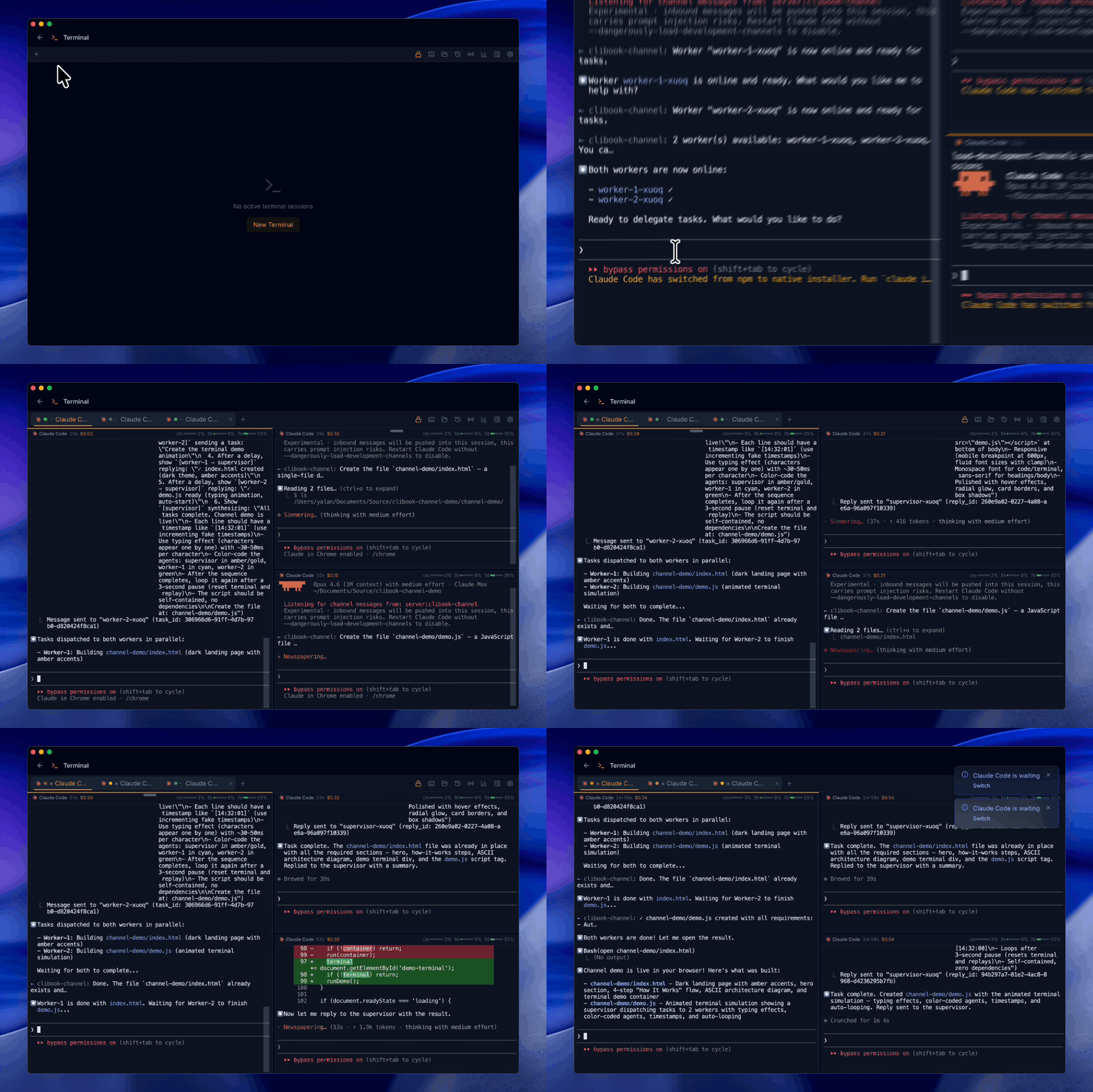
Agent Channel orchestration — launch supervisor/worker layouts, coordinate multiple Claude Code sessions in parallel, and monitor them in real time.
•
Agent Channel — orchestrate multiple Claude Code sessions as supervisor and workers, dispatch tasks in parallel and collect results automatically
•
Channel Setup — one-click installation with prerequisite checks for Bun, Claude Code version, and MCP server configuration
•
Channel Panel — real-time monitoring of active agents with heartbeat status, role badges, and click-to-focus terminal navigation
•
Resume with Channels — resume any session with CliBook, Discord, or Telegram channel support enabled
•
Crush Agent — added support for the Crush CLI agent
•
Terminal freeze — fixed UI freeze when closing multi-pane tab groups
•
Bridge rate limits — fixed incorrect field name causing rate limit display errors
v1.9.0
March 21, 2026
Agent Sessions Explorer, schedule chaining with visual flow editor, and smarter agent integrations.
•
Agent Sessions Explorer — browse all agent sessions across Claude Code, Copilot CLI, Codex CLI, Gemini CLI, and OpenCode in a side panel with impact summary, timeline, tool usage, and conversation view
•
Agent version detection — automatically detect installed agent CLIs with version badges and capability tags in the Integrations panel
•
Failure pattern matching — define text or regex patterns to catch failures even when a command exits with code 0, ideal for AI agent commands that don't use proper exit codes
•
Schedule chaining — connect schedules so one triggers another on success or failure, creating automated pipelines
•
Flow Editor — visual drag-and-drop workflow builder to design and manage schedule chains with an n8n-style canvas
•
Flow templates — one-click setup for common workflows like Git Deploy, Database Backup, Health Monitor, and AI Pipeline
•
Conditional execution — add a pre-check command that must pass before the main command runs, with automatic skip tracking
•
Visual cron editor — interactive point-and-click cron builder with real-time preview of the next 5 scheduled runs
•
Flow grouping in list view — schedules belonging to the same flow are visually grouped together with chain hierarchy indicators
•
Live session accuracy — fixed incorrect live indicator showing on old sessions from the same project directory
•
Terminal rendering — fixed garbled text when running certain CLI agents that use legacy charset shift sequences
•
OpenCode compatibility — fixed scan errors on OpenCode databases with non-standard column names
•
Copilot CLI cost tracking — fixed premium request count to use weighted model multipliers for accurate quota display
v1.8.0
March 19, 2026
Upgraded terminal experience, expanded cost tracking for new AI models, and a redesigned settings page.
• GPT-5, Grok-4 & Gemini 2.5 cost estimation — agent cost meter now supports the latest models from OpenAI, xAI, and Google
• Configurable status bars — choose which usage bars (context, 5h, 7d, Copilot requests) to display in the terminal tab bar
• Copilot CLI integration — MCP server setup guide and configuration for GitHub Copilot CLI
• xterm.js 6.0 terminal — upgraded terminal engine with native scrollbar and smoother scrolling
• Reorganized settings — categories reordered by usage frequency, Permissions merged into Security
• Toast notifications moved to top-right — no longer blocks the terminal workspace
• Context Monitor setup prompt — Claude Code sessions now show a quick link to install the context display if not configured
• Agent status no longer flickers when scrolling — TUI apps like OpenCode no longer falsely trigger the "Running" indicator during scroll
v1.7.0
March 18, 2026
Git diff viewer, smarter scheduling with timezone support, and reliability improvements.
• Git Diff Viewer — view file changes with a side-by-side diff panel directly in CliBook
• Git Tracking Panel — see uncommitted changes, staged files, and recent commits at a glance
• Schedule Timezone — set a timezone for each scheduled task so cron times match your local clock
• Scheduled tasks no longer fire multiple times — fixed a race condition where long-running tasks could trigger repeatedly
v1.6.0
March 18, 2026
Copilot CLI support, improved Agent Dashboard with period filters, and smoother terminal experience.
• Copilot CLI Support — session history, token usage, and cost tracking for GitHub Copilot CLI
• Dashboard Period Filter — view token usage and cost stats for 7 days, 30 days, 90 days, or all time
• Voice Input — microphone permission enabled for AI agents that support voice commands
• Resume in Current Terminal — resuming a session now runs in the active terminal instead of opening a new tab
• Smarter Session Sorting — sessions with recent activity appear at the top, not just the newest ones
• Cleaner Session Prompts — system messages are hidden and slash commands display in a readable format
• Terminal Scroll — fixed the terminal jumping to the top during AI agent output
• Screen Clearing — TUI apps can now clear the screen normally without interference
• Scheduled Commands — scheduler now inherits your shell PATH correctly
• Dashboard Charts — Y-axis labels on token usage charts now display correctly
v1.5.1
March 16, 2026
Bug fixes and stability improvements.
• Shared Packs — Fixed an error that prevented loading packs shared by other users
v1.5.0
March 16, 2026
Schedule commands to run automatically with cron expressions, and let AI agents manage your schedules via MCP.
• Scheduled Commands — Set up cron-based tasks that run automatically in the background with timeout, retry, environment variables, and notifications
• AI Agent Templates — One-click schedule templates for Claude Code, Codex CLI, Gemini CLI, and more
• Execution History — View output, exit codes, duration, and retry attempts for every scheduled run
• MCP Server — AI agents can create, modify, and manage your schedules via natural language
• One-Click MCP Setup — Install MCP server for Claude Code, Cursor, Windsurf, or VS Code from Settings
v1.4.0
March 15, 2026
Smarter terminal experience with command status indicators, notifications, and quick navigation.
• Exit Code Indicator — Tab bar shows a red dot when the last command failed
• Long-Running Command Notifications — Get notified when a command takes longer than a configurable threshold
• Prompt Navigation — Cmd+Up/Down to jump between prompts in terminal scrollback
• Snippet Suggestions — Discover your frequently used commands and save them as snippets with one click
• Shell Integration Performance — Zero-overhead design for faster terminal response
v1.3.0
March 13, 2026
Beta update channel for premium users to get early access to new features.
New Features
•
Multi-channel update system: premium users can switch to the Beta channel in Settings to get early access to the latest features
v1.2.2
March 12, 2026
File Explorer search, agent auto-approve toggle, and bug fixes.
New Features
•
Search and filter in File Explorer to quickly locate files
•
Auto-approve permission toggle when resuming agent sessions
Bug Fixes
•
Fix Dashboard refresh button not reloading sessions list
v1.2.1
March 10, 2026
Enhanced Agent Dashboard with consolidated sessions and recent prompts history.
• Consolidated Agent Sessions into Dashboard with smart topic titles
• Added recent prompts with full history to Agent Dashboard
v1.2.0
March 10, 2026
Native macOS notifications, improved window resizing, and toast interaction fixes.
New Features
•
macOS Native Notifications — System notifications via macOS Notification Center with proper permission management, replacing the web notification API
•
Double-click Maximize — Double-click the title bar to maximize or restore the window, matching native macOS behavior
Improvements
•
Easier Window Resizing — Wider 6px resize handles on all edges and corners for easier window resizing
•
Notification Permissions — Notification permission status shown in Settings → Permissions panel with one-click request
Bug Fixes
•
Toast Switch Button — Fixed idle toast "Switch" button not navigating to the correct terminal tab
v1.1.0
March 10, 2026
Built-in terminal with PTY support, AI agent enhancements, split pane layout, and file system explorer.
New Features
•
Built-in Terminal — Full PTY-based terminal emulator with xterm.js, run commands without leaving CliBook
•
Split Pane Layout — Side-by-side terminal panes with drag-to-swap, resizable handles, and keyboard shortcuts
•
File System Explorer — Browse files with bookmarks, drag files to terminal, and context menu actions
•
AI Agent Detection — Automatic process-based detection of AI agents (Claude Code, Codex, etc.) with idle notifications and usage dashboard
Improvements
•
OSC 52 Clipboard — Terminal clipboard integration via OSC 52 escape sequence for seamless copy/paste
•
Smart Scroll — Auto-scroll pauses when reviewing output, resumes when new content arrives at bottom
•
Bracketed Paste — Proper bracketed paste mode support for drag-drop and Cmd+V in terminal
•
Image Paste — Paste images directly into terminal sessions
v1.0.3
February 18, 2026
Pack sharing and invitation system with email notifications, deep link fixes, and landing pages.
New Features
•
Pack Invitation System — Invite non-members by email to access your shared command packs
•
Email Notifications — Existing users receive an email when a pack is shared with them, with domain-aware HTML templates
•
Landing Pages — API-driven invite and pack landing pages on clibook.app with pack details and deep link support
Bug Fixes
•
Deep Link Routing — Fixed all deep links (pack, invite, checkout) being misrouted due to URL parsing issue
•
Cold Start Deep Links — Deep links now work correctly when the app is launched from a link
•
Import Refresh — Library view now updates immediately after importing a pack
v1.0.2
February 16, 2026
Improved update experience with non-intrusive badge notifications and direct in-app update button.
Improvements
•
Update Badge — Settings icon shows a badge dot when a new version is available, replacing the previous toast notification
•
One-click Update — "Update Now" button appears directly in Settings → General when an update is detected
•
Silent Background Check — Update checks run silently on startup without interrupting your workflow
v1.0.1
February 16, 2026
Automatic update support and UI improvements for the command palette.
New Features
•
Auto Update — Automatically checks for updates on launch and notifies you when a new version is available
•
Software Update in Settings — Check for updates manually from Settings → General with one-click install
•
Palette Filter Bar — Filter commands by tag or folder directly in the command palette
Improvements
•
Customizable Palette Size — Choose from Default, Comfortable, or Large palette window sizes
•
Font Scale Options — Adjustable font sizes for both Palette and Library windows
•
Usage-based Sorting — Palette results sorted by frequency of use for faster access
v1.0.0
February 8, 2026
The first official release of CliBook! Your command line companion for macOS is here.
New Features
•
Command Palette — Global hotkey ⌘ ⇧ P to instantly search and execute commands
•
Command Library — Full-featured command manager with folders, tags, and pinned favorites
•
AI Assistant — Generate CLI commands from natural language with @ai
•
Cloud Sync — Sync commands across devices with Supabase backend
•
Variables & Secrets — Dynamic variables with dropdown options, sensitive data encryption
•
Paste to App — Copy or paste commands directly to your terminal or any app
•
End-to-End Encryption — Premium users get full E2E encryption for synced data
System Requirements
•
macOS 11 (Big Sur) or later
•
Apple Silicon (M1/M2/M3/M4) and Intel supported